Thank you SO much, Ms_Dee!!!
Thursday, August 7, 2008
IT CAME! IT CAME!
Today my blog candy from Ms_Dee arrived! A new Paper Gator!
Look out world! Everything with corners will now be rounded!
Thank you SO much, Ms_Dee!!!
Saturday, July 26, 2008
Dad's Birthday - Double Pocket Card
Today is my Dad's birthday...Happy Birthday, Dad! He is a wonderful man and also one of my biggest crafting supporters. He bought me my Cricut and almost every cartridge I own. I guess I could gush about him here, but I won't...I'll just say I love him.
Ever since I saw the inspiration ad from BBTB, I had been thinking about how the background of that ad was divided into three parts...the sky, the grass, and the fence. I knew I wanted to do something with that idea, but wasn't sure exactly what...then I remembered the double pocket cards that I had seen people make on the Cricut message board. I thought this went along well with the idea of the three pieces of background and then with the woman standing in the front I liked the idea of having the tags in the pockets kind of breaking up the background. So anyway, there was my inspiration.
It is not easy to make a manly card. I wanted to do something different for the tags but nothing girly. Then I remembered that I had this Street Sign cartridge (courtesy of the wonderful Hallmark Scrapbook) that I have been wanting to use, but didn't know what for...and saw one of the road signs that I thought would make a neat tag. Then I saw the arrows and decided to use those since I have never really done anything with arrows before, either.
Here is a picture of the front of the card:
I am loving the swirly clips and thought that was a good addition. I used the AMAZING Storybook cartridge for "DAD". The tags and arrows are from Street Sign.
Here is a view with the tags out of the pockets:
I used the Journals A la Mode set from Fancy Pants for the stamping on the tags...I thought these were fun flourishes, but they still looked man-ish. All the ink on the card is Tim Holtz Distress Ink in Tea Dye. I will have our kids write or draw on each of the tags something special for Grandpa.
The inside of the card:
Since he is 57 today, my husband had the great idea of using the roadsign on the inside of the card to represent that. I was just going to write "Happy Birthday", but his idea was better. The numbers are done with the Storybook cartridge and the sign and arrows are done with the Street Sign cartridge (again). The arrow at the bottom is where we will sign our names.
Thanks for looking!
Thursday, July 24, 2008
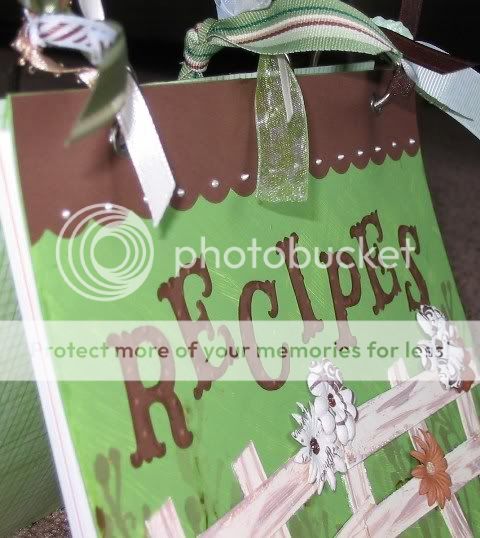
Family Recipe Book
Let me start off by saying there are lots of major events and goings on in my family this year. This Saturday, one of my cousins is getting married. In September, another of my cousins is getting married. Also in September, my cousin is having her first baby. In October, my husband's brother is getting married. And then of course next January is when our new baby is expected to arrive.
I wanted to find something to do for wedding gifts that would be special...but cheap. So, I decided to make a family recipe book.

The design for the book was inspired by BBTB. I painted some plain chipboard sheets (cut a bit bigger than a half sheet) green and tried to give it a grassy effect. The part I was most inspired by on BBTB was the fence, so I wanted that to be a major part of my project. I cut some "fence" from chipboard and painted the pieces and antique white with some brown streaking for a weathered look. I was also loving the colors shown in the example on BBTB so I used green, brown, and shades of white as my palette.

I stamped the cover with different shades of brown ink using an Autumn Leaves clear stamp. and then attached the fence and some fun Primas. The centers of the Primas are done with Stickles or Liquid Pearls. There is a bit more Stickling on the fence and some Liquid Pearls along the top scallop on the front cover. The lettering is done with the new Cricut cartridge, Storybook! I am blessed enough to have some wonderful friends who bought this for me from the wonderful Hallmark Scrapbook as an early birthday present! (THANKS!) I used Distress Ink to make the letters stand out a bit more and Cuttlebugged them with the Swiss Dots embossing folder. I covered the inside of the front and back covers with some DCWV paper.

I used a fun border cut from the Storybook cartridge and topped it off with some Stickles for a fun accent on the back cover.
Okay, inside...

I did two title pages - one for "Main Dishes" and one for "Extras" (side dishes, desserts, etc.) I scanned in some of the recipes written by my Grandma and used that as a subtle background. I then used Distress Ink around the edges and added some beautiful corner cuts from, once again, Storybook. I love this cartridge! I added some Stickles on the corner cuts, but those don't show up too well in the picture.
I e-mailed and called folks in my family and asked them to give me some of their favorite recipes and formatted and printed those off on cardstock. I made each recipe page a half of an 8 1/2 x 11 sheet. I used my Crop-A-Dile to punch the holes for the rings.
I topped the whole project off with some eyelets courtesy of the Crop-A-Dile and some rings courtesy of a sweet RAK-er from the Cricut MB. I then went through my ribbon box with my daughter and we picked out some fun ribbons to "tie" the project all together.
I was very excited to have this project done just an hour or so before I needed to get it in the hands of the one who will be toting it to the wedding for me :o) Thanks for looking!
I wanted to find something to do for wedding gifts that would be special...but cheap. So, I decided to make a family recipe book.
The design for the book was inspired by BBTB. I painted some plain chipboard sheets (cut a bit bigger than a half sheet) green and tried to give it a grassy effect. The part I was most inspired by on BBTB was the fence, so I wanted that to be a major part of my project. I cut some "fence" from chipboard and painted the pieces and antique white with some brown streaking for a weathered look. I was also loving the colors shown in the example on BBTB so I used green, brown, and shades of white as my palette.
I stamped the cover with different shades of brown ink using an Autumn Leaves clear stamp. and then attached the fence and some fun Primas. The centers of the Primas are done with Stickles or Liquid Pearls. There is a bit more Stickling on the fence and some Liquid Pearls along the top scallop on the front cover. The lettering is done with the new Cricut cartridge, Storybook! I am blessed enough to have some wonderful friends who bought this for me from the wonderful Hallmark Scrapbook as an early birthday present! (THANKS!) I used Distress Ink to make the letters stand out a bit more and Cuttlebugged them with the Swiss Dots embossing folder. I covered the inside of the front and back covers with some DCWV paper.
I used a fun border cut from the Storybook cartridge and topped it off with some Stickles for a fun accent on the back cover.
Okay, inside...
I did two title pages - one for "Main Dishes" and one for "Extras" (side dishes, desserts, etc.) I scanned in some of the recipes written by my Grandma and used that as a subtle background. I then used Distress Ink around the edges and added some beautiful corner cuts from, once again, Storybook. I love this cartridge! I added some Stickles on the corner cuts, but those don't show up too well in the picture.
I e-mailed and called folks in my family and asked them to give me some of their favorite recipes and formatted and printed those off on cardstock. I made each recipe page a half of an 8 1/2 x 11 sheet. I used my Crop-A-Dile to punch the holes for the rings.
I topped the whole project off with some eyelets courtesy of the Crop-A-Dile and some rings courtesy of a sweet RAK-er from the Cricut MB. I then went through my ribbon box with my daughter and we picked out some fun ribbons to "tie" the project all together.
I was very excited to have this project done just an hour or so before I needed to get it in the hands of the one who will be toting it to the wedding for me :o) Thanks for looking!
Tuesday, May 20, 2008
Engagement/Wedding Cards
Here are some cards I made to congratulate my cousins (and their soon-to-be-wives) on their engagement and upcoming weddings:

I used the new Cricut Home Accents cartridge for all the cuts...love it!!!
Mother's Day Creations
Here is a mini photo album I altered for Mother's Day and the card I made with it:

Also, some other cards I made with the same stamps, just different colors.

And the inside of the card looks something like this (differing in color, of course):
Also, some other cards I made with the same stamps, just different colors.
And the inside of the card looks something like this (differing in color, of course):
Wednesday, April 2, 2008
Fall Fun
I made this layout for a challenge. I had to use at least 5 colors on the layout, Doodlebug glitter (it is on the lettering and scroll-y thing), the Cricut (used Alphalicious for the lettering), and the Cuttlebug (the scroll-y thing is cut out from the Swirls embossing folder). I also added some ribbons and buttons. Oh, and I used my Fastenater for the first time.
I really have not made layouts before. I have done the two page family tree spread and then a title page for the family album I hope to make. I had fun with this but it still looks like too much empty space or something. I didn't really know what to do. It was harder than I expected to make a layout. I had all these nice fall colors in my head that I wanted to use, but they all clashed so bad with the pictures...so I had to use bright colors for a fall layout. Kinda weird I thought, but I guess it works.
Anyway, here it is:

Give me hints on how to improve!
I really have not made layouts before. I have done the two page family tree spread and then a title page for the family album I hope to make. I had fun with this but it still looks like too much empty space or something. I didn't really know what to do. It was harder than I expected to make a layout. I had all these nice fall colors in my head that I wanted to use, but they all clashed so bad with the pictures...so I had to use bright colors for a fall layout. Kinda weird I thought, but I guess it works.
Anyway, here it is:
Give me hints on how to improve!
Labels:
2 Page Layouts,
Cricut,
Cuttlebug,
Layouts,
Prima
Tuesday, March 25, 2008
Tickled Pink
I made this card in response to a challenge from Bitten By The Bug (the link is listed in my "Sites To See" on the right). I don't know if it was the drugs I was on for recovering from a tonsillectomy or what, but for some reason I thought I would try to make a card out of a tiny paper bag. This is what I came up with...

I used the Cuttlebug Swiss Dots embossing folder on the front flap. The "Tickled Pink" is a cut out I had from some paper stack and was the inspiration for the whole card. I coated it with Glossy Accents to stiffen it up and give it shine and dimension. I used Primas from the Essentials Baby Girl collection and some Lime Green and Fruit Punch Stickles. The scalloped cut is a Cricut cut.

Inside I have more Cricut cuts (scalloped square and the round pink tag). I love how the Swiss Dots embossing shows through on the left side. I used ribbons and more Glossy Accents and Stickles on the inside.
In the opening of the bag there is another scalloped square Cricut cut with a tab (another cut out from the paper stack).


Please let me know what you think! Thanks for looking!
I used the Cuttlebug Swiss Dots embossing folder on the front flap. The "Tickled Pink" is a cut out I had from some paper stack and was the inspiration for the whole card. I coated it with Glossy Accents to stiffen it up and give it shine and dimension. I used Primas from the Essentials Baby Girl collection and some Lime Green and Fruit Punch Stickles. The scalloped cut is a Cricut cut.
Inside I have more Cricut cuts (scalloped square and the round pink tag). I love how the Swiss Dots embossing shows through on the left side. I used ribbons and more Glossy Accents and Stickles on the inside.
In the opening of the bag there is another scalloped square Cricut cut with a tab (another cut out from the paper stack).
Please let me know what you think! Thanks for looking!
Wednesday, February 27, 2008
BBTB - Spring Card Contest - Entry #2
I made this for a friend who just had a birthday (and I am late getting it to her...oops!) I made a basic criss cross card in the smaller A2 size that I posted awhile back on the Cricut message boards. I stamped the corner flourish in brown (it is a See D's stamp) and then went over it with Glossy Accents. It is hard to capture on camera how it looks in real life. I did not succeed. I free handed the yellow Stickles and added some Liquid Pearls there also. The scalloped circle and two other circles are Cricut cuts. Thanks for looking!
Friday, February 15, 2008
BBTB - Spring Card Contest
For this BBTB contest, we had to make a spring card using pink, orange, yellow, green, and brown. The Cricut cuts are from New Arrival (front) and Walk In My Garden (inside). I had a lot of fun making this card and I hope you enjoy it!
Front:

Inside (on left side...right side is blank):
Front:
Inside (on left side...right side is blank):
Tuesday, January 22, 2008
BBTB - Shape Card Contest
I made two shape cards for two birthdays this week.
The first is for my sister-in-law:

I cut the cake from Celebrations. (I believe the tag was cut from Celebrations as well.) I cut a shadow in blue and regular in white. I cut another in white vellum and Cuttlebugged it with the swirls. I inked that with some silver ink to bring out the swirls. I used Ice Stickles and Stickles to give it some sparkle. I put some tiny blue Primas along the bottom and added some rhinestone bling. I tied the tag on with some cute ribbon.
The next is for my son, who turns two on Friday and LOVES Lightning McQueen:

I cut everything from George. The card is hinged like a hood. The tires are attached to the back of the card. I Cuttlebugged the tires with mesh. This is made mainly of the shapes from the F and D keys (and then circles for the eyes). The picture doesn't do justice to the shine on Lightning McQueen. The Stickles really sparkle.
As many people have asked for directions I am going to add them here from memory...I hope they are right :o) (Sorry for the weird wording as I don't know exactly what to call each of the shapes).
The first is for my sister-in-law:
I cut the cake from Celebrations. (I believe the tag was cut from Celebrations as well.) I cut a shadow in blue and regular in white. I cut another in white vellum and Cuttlebugged it with the swirls. I inked that with some silver ink to bring out the swirls. I used Ice Stickles and Stickles to give it some sparkle. I put some tiny blue Primas along the bottom and added some rhinestone bling. I tied the tag on with some cute ribbon.
The next is for my son, who turns two on Friday and LOVES Lightning McQueen:
I cut everything from George. The card is hinged like a hood. The tires are attached to the back of the card. I Cuttlebugged the tires with mesh. This is made mainly of the shapes from the F and D keys (and then circles for the eyes). The picture doesn't do justice to the shine on Lightning McQueen. The Stickles really sparkle.
As many people have asked for directions I am going to add them here from memory...I hope they are right :o) (Sorry for the weird wording as I don't know exactly what to call each of the shapes).
- Cut two Shift F shapes at 5" in red.
- Cut one Shift D shape at 3 1/2" in red.
- Cut one Shift D shape at 3" in white.
- Cut one Shift F shape at 2" in black. Cuttlebug with mesh embossing folder and cut in half.
- Cut two Shift G shapes at 1" in white.
- Cut one Shift D shape at 2 1/2" (I think) in white. Cut across the bottom corners to make the smile.
- Cut two blue circles for eyes.
- Attach the tires to the back of one 5" red shape. Score the other 5" red shape about 1/4" from the top and attach it to the other 5" red shape.
- Attach the 3" white shape to the 3 1/2" red shape. Attach them to the back of the 5" red shapes.
- Attach the blue eyes to the white that is showing.
- Attach the headlights and smile.
- Decorate as desired.
Subscribe to:
Posts (Atom)